
How to Tell If a Receipt Is Fake?

Reggie Jacobs
Founder of Receipt Maker & Document Management Expert
Expense fraud is getting smarter. Learn exactly how to tell if a receipt is fake using visual clues, data auditing, and digital forensics to protect your bottom line.
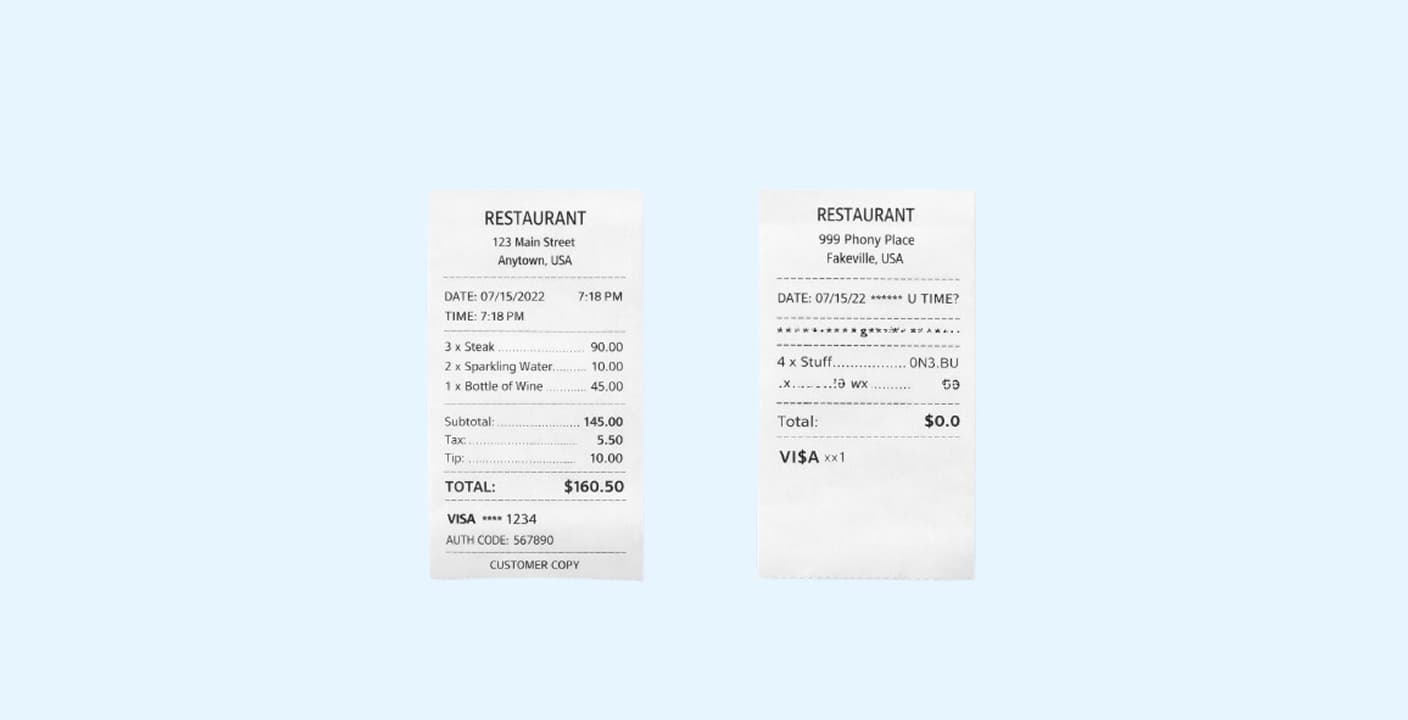
Red Flags to Watch For
Three main ways to spot fake receipts:
- Visual Test: Check for bad fonts, blurry logos, paper that looks too perfect, or misaligned prices
- Math Test: Verify tax calculations match local rates, check line items make sense, watch for duplicate transaction numbers
- Tech Test: Analyze file metadata (EXIF data) - if it shows Photoshop or Canva instead of a camera, it's fake
Pro tip: Use reverse image search to check if the receipt image appears elsewhere online.
Expense fraud is getting smarter. Learn exactly how to tell if a receipt is fake using visual clues, data auditing, and digital forensics to protect your bottom line.
Expense fraud is the silent budget killer that nobody wants to talk about.
It used to be simple. An employee would grab a blank receipt pad and scribble in a fake lunch. Or maybe they would use Photoshop to change a $10 cab ride into a $100 one. Those were the good old days.
Today the game has changed. We have receipt generator websites and AI tools that can create a perfectly convincing Starbucks invoice in seconds.
If you are approving expenses or auditing finances, you are the goalie. You need to know exactly what to look for before that money leaves the company bank account. For legitimate receipts, use a receipt creator that produces audit-ready documentation.
Here is your guide on how to spot the fakes, from the obvious blunders to the sophisticated digital forgeries.
The Eye Test: Visual Inconsistencies
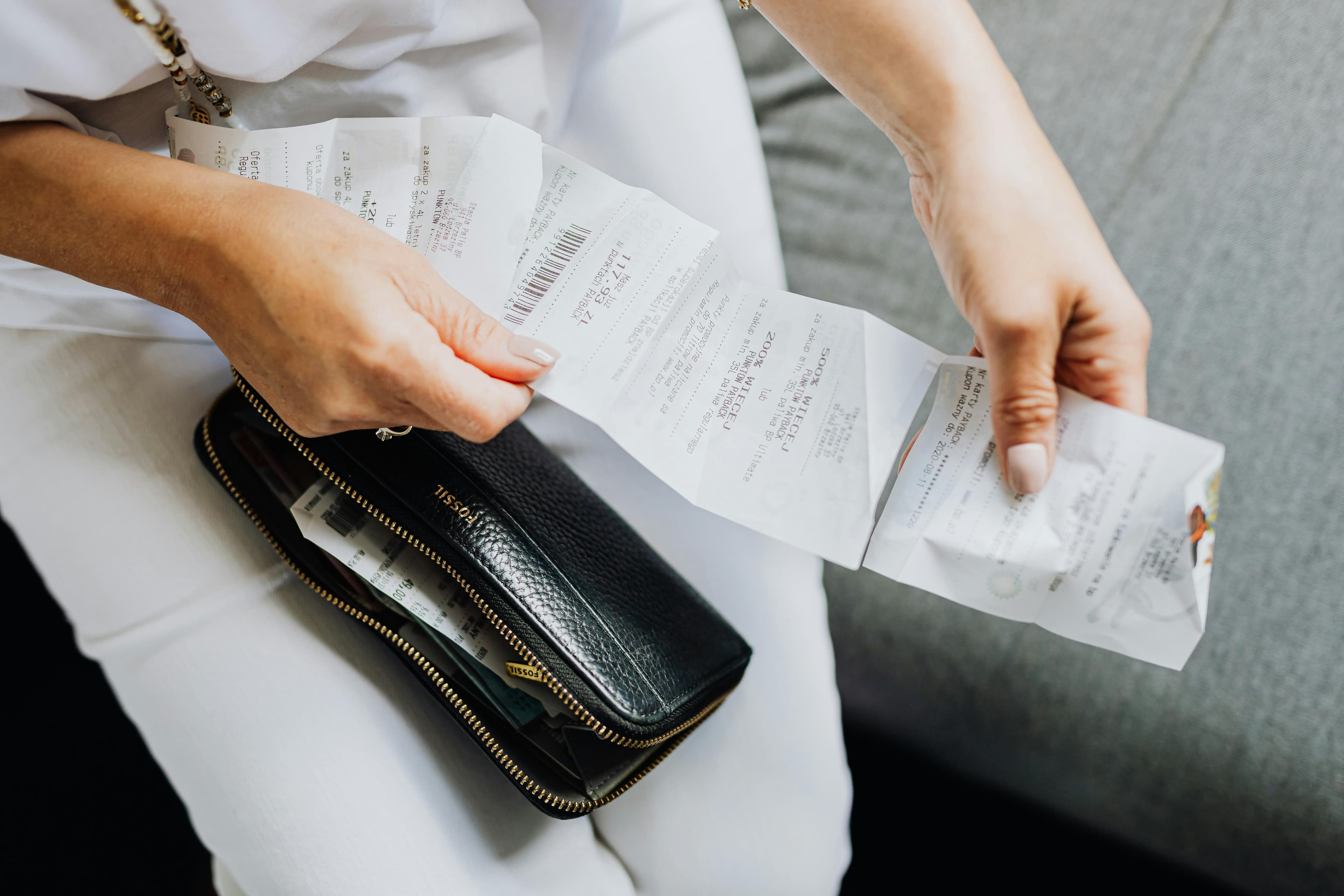
The first line of defense is your own eyes. Even the best fake receipt generators usually mess up the small design details. When you look at hundreds of receipts a day, the weird ones tend to stick out.
You just need to know where to look.
Check the Font and Typography
Real receipts use thermal printers. These printers have very specific, usually monospaced fonts.
Fakes often rely on standard computer fonts like Arial or Times New Roman. If the font looks too crisp, too common, or varies in size throughout the document, that is a red flag.
Look closely at the alignment. On a real receipt, the prices usually line up perfectly on the right side. On a fake, you will often see floating decimals or currency symbols that don't sit quite right with the numbers.
The Perfect Condition Trap
Physical receipts are messy. They get crumpled in pockets. The ink fades. The edges are torn.
If an employee submits a photo of a physical receipt that looks pristine, flat, and perfectly white, be suspicious.
Watch out for:
- No shadows: A real photo of a piece of paper usually has shadows or uneven lighting.
- Perfect cropping: If the image is cropped exactly to the edge of the paper with zero background visible, it might be a digital creation rather than a photo.
- Blurry logos: Sometimes the text is crystal clear but the store logo at the top is pixelated. This happens when fraudsters copy-paste a low-quality logo onto a high-quality fake background.
The Thermal Paper Test
If you have the physical receipt in your hand, you have a huge advantage. Most retail receipts are printed on thermal paper.
You can test this easily. Scratch the paper gently with your fingernail. If it leaves a grey or black mark, it is real thermal paper. If it doesn't leave a mark, it is likely standard printer paper cut to size.
The Math Test: Data That Doesn't Add Up
Fraudsters are often bad at math. They focus so much on making the receipt look real that they forget to check if the numbers make sense.
Tax Miscalculations
This is the most common error. The fraudster enters a subtotal and a total, but they guess the tax amount.
Always do a quick spot check on the tax rate. If the receipt is from a restaurant in New York City, the sales tax should match the local rate (8.875%). If the tax amount is a round number or clearly too low, the receipt is likely fabricated.
The Items Bought
Read the line items. Do not just look at the total.
I have seen business lunches that were actually itemized receipts for children's clothing or grocery store runs. Fraudsters often hope you will just look at the vendor name and the final price.
Common giveaways:
- Generic SKUs: A receipt that lists Item 1 or General Merchandise instead of specific product names.
- Time and Date irregularities: Did the employee buy dinner at 3:00 PM? Did they claim a taxi ride in London two hours after buying coffee in San Francisco?
Duplicate Transaction Numbers
Every receipt has a unique transaction ID or invoice number.
If you see the same transaction number appear on two different receipts from different days, you have found a fake. This happens when an employee uses the same template twice and forgets to update the metadata.
Pro Tip: If you see a receipt number like 000001 or 123456, it is almost certainly a fake. Real POS systems generate long, complex, non-sequential strings.
The Tech Test: Digital Forensics
If the receipt is a digital file (like a PDF or JPG), you can look under the hood. This is where you catch the sophisticated fakes.
Analyze the Metadata (EXIF Data)
Every digital file has metadata attached to it. This data tells you the history of the file.
If an employee claims they took a picture of a receipt with their iPhone, the metadata should reflect that.
How to check:
- Right-click the image file.
- Select Properties (Windows) or Get Info (Mac).
- Look at the Details or More Info tab.
If the Creating Software says Adobe Photoshop or Canva instead of a camera model, you are looking at a forgery.
Reverse Image Search
If a receipt looks generic, it might be a stock image.
Employees sometimes download a picture of a generic restaurant receipt from Google Images and submit it. You can drag and drop the image into Google Lens or a reverse image search tool. If that exact receipt image appears on other websites, it is fake.
Comparison: Real vs. Fake Indicators
Use this table as a quick cheat sheet when you are auditing expenses.
| Feature | Real Receipt | Fake Receipt |
|---|---|---|
| Paper Quality | Thin, waxy thermal paper | Standard printer paper (too thick/white) |
| Alignment | Monospaced, aligned columns | Variable fonts, floating prices |
| Logos | Clear monochrome or grayscale | Pixelated, blurry, or wrong color |
| Tax | Exact calculation based on location | Rounded numbers or incorrect rates |
| Metadata | Camera details (iPhone, Samsung, etc.) | Editing software (Photoshop, Paint) |
| Edges | Rough, torn, or imperfect cuts | Perfectly straight scissor cuts |
Why You Need Automated Tools
Checking every single receipt manually is impossible if your company is growing. You cannot be the receipt police forever.
Eventually you need to move from manual checks to automated validation. Modern expense management software uses OCR (Optical Character Recognition) to read receipts instantly.
These tools can automatically:
- Flag duplicate receipts across different employees.
- Detect if a receipt has been submitted previously (even months ago).
- Verify that the merchant actually exists.
- Check the math on taxes and tips instantly.
If you are processing more than 50 receipts a month, the cost of the software is usually lower than the cost of the fraud you are likely missing.
Summary
Spotting fake receipts is a mix of art and science.
You start with the Visual Test. Look for bad fonts, blurry logos, and paper that looks too perfect.
Then you move to the Math Test. Check the taxes, the time stamps, and the item descriptions. Make sure the story adds up.
Finally, use the Tech Test. Check the file metadata to see if it was made in Photoshop.
Fraud evolves, but the basics of attention to detail remain the same.
Next Step
Do you want to audit your current expense process? Pick a random sample of 10 high-value receipts from last month and apply the Math Test to them. You might be surprised by what you find.
Frequently Asked Questions (FAQ)
Is it illegal to modify a receipt?
Yes. Altering a receipt to claim more money than you spent is fraud. It is a crime and can lead to immediate termination or legal action.
Can AI generate fake receipts?
Yes. There are AI tools that can generate very convincing receipts. However, they often hallucinate details or get tax calculations wrong, which is how you catch them.
What is the most common type of receipt fraud?
The most common type is modifying the total amount on a legitimate receipt (e.g., adding a zero to a tip) or submitting the same receipt twice.
How do I organize receipts to prevent fraud?
Require employees to upload receipts immediately after the transaction using a mobile app. This prevents them from losing receipts or having time to alter them later. Digital trails are harder to fake than paper ones.
Related Articles
How to Organize Receipts for Business in 2026
A disorganized receipt system costs the average small business owner 40+ hours per year. Here's a proven system you can set up in under an hour.
What Is an Itemized Receipt
An itemized receipt lists every product or service in a transaction with individual prices. Learn why it's essential for tax deductions, reimbursements, and audits.