
How to Fill Out a Receipt Book (The 1-Minute Guide)

Reggie Jacobs
Founder of Receipt Maker & Document Management Expert
One missing field on a receipt can cost you thousands in a tax audit. Here's the exact 5-step protocol to fill out receipt books correctly every time.
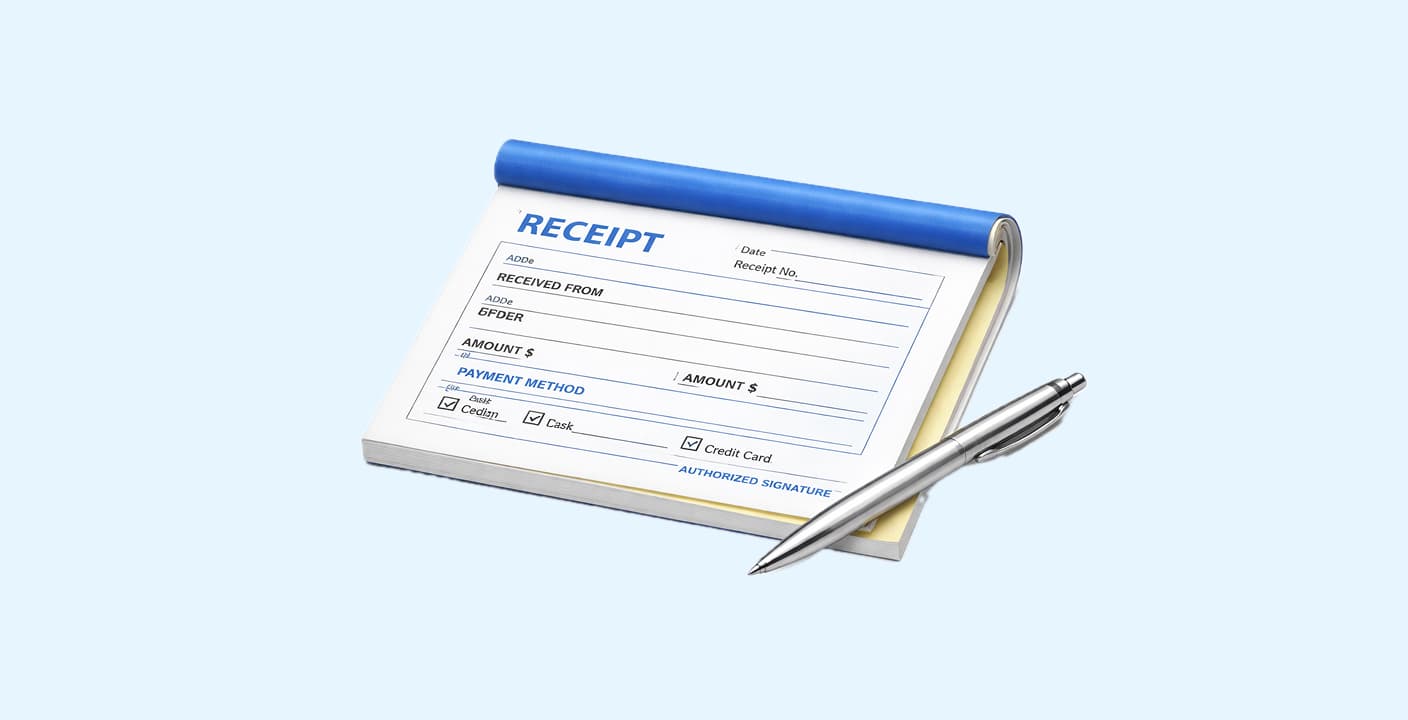
Essential Fields Checklist
Every receipt must include these 7 elements:
- Date - use MM/DD/YYYY format for clarity
- Receipt number - sequential tracking (pre-printed on most books)
- "Received from" - full legal name of payer (business or individual)
- Amount - write in both numbers AND words to prevent alteration
- "For" / description - specific service or product (e.g., "Rent for 123 Main St, April 2026")
- Payment method - cash, check, money order, or card
- Your signature - makes it legally binding
Pro tip: Always use the cardboard divider to prevent ink bleed-through to subsequent receipts.
Legal requirement: Keep carbon copies for minimum 7 years for IRS compliance.
You finish the job, the client hands you cash, and you open that fresh booklet of carbon receipts. Then you freeze.
It sounds trivial, filling out a receipt. But in the heat of a transaction, with a client watching, it’s easy to skip a field, forget the date, or mess up the math. Happens to all of us.
Bad receipts lead to three things: tax nightmares, lost disputes, and looking amateur. Good receipts are your first line of defense against audits and "I thought I paid that" conversations.
Whether you are a landlord, a freelancer, or a small business owner, here is the definitive framework and template for filling out a receipt book correctly every single time. Prefer a digital option? Use our receipt maker online to create and download receipts instantly.
How to Fill Out a Receipt Book: Simple 5-Step Protocol
Most mistakes happen because we treat receipts as "admin work" rather than legal documents. Treat every receipt like a mini-contract.
1. The Setup (Don’t Skip This)
If you’re using a physical carbon-copy receipt book (the kind with white and yellow or pink pages), always place the cardboard divider between the receipt you’re writing and the next set of pages.
Why this matters:
If you don’t, the pressure from your pen will bleed through to the next 3–4 receipts underneath, ruining them and destroying clean records.
The rule:
If you can’t find the divider, slide a thick piece of paper, a manila folder, or even the back cover of the book underneath the receipt before you start writing.
This takes five seconds and prevents hours of cleanup later.
2. The “Received From” Field
Always write the full name of the person or business that paid you.
If it’s a business, use the legal entity name (for example, Apex Plumbing LLC or Riverstone Property Group Inc.).
If it’s an individual or tenant, write their full name. If multiple people are on the lease or contract, list all names when possible, or at least the primary payer.
This ensures the receipt can always be traced back to the correct party.
3. The “For” Section (The Dispute Killer)
This is the most important line on the entire receipt.
Never write vague descriptions like “Rent,” “Labor,” or “Services.” These create confusion and are the first thing questioned if a dispute arises.
Instead, be specific and detailed.
Bad: Rent
Good: Rent for Unit 4B - March 2024
Bad: Labor
Good: Labor: Installed 2× Ceiling Fans and 1× Dimmer Switch
The Specificity Test:
Ask yourself: If a stranger read this receipt three years from now, would they know exactly what was sold?
If the answer is no, rewrite it.
Specificity is your best protection.
4. The Amounts (Words vs. Numbers)
Every receipt has two places for the amount:
One small box for the number (for example, $150.00) and one long line to write it out in words (One Hundred Fifty Dollars).
Always fill out both.
Writing the amount in words makes it extremely difficult to alter the payment later and protects both you and the payer from fraud.
5. Sign and Date
A receipt without a date or signature is essentially meaningless.
Write the date the money actually changed hands, not the day the work was performed.
Then add your initials or full signature to authenticate the document.
Watch this quick visual walkthrough for a real-world example:
The "Rent Receipt" Variation
Landlords have the highest search volume for receipt templates because the stakes are higher (eviction courts require proof).
If you are filling this out for Rent, you must include:
- The Rental Period: e.g., "Rent for Jan 1 - Jan 31".
- Payment Method: Vital for disputes. If they paid cash, mark "CASH" clearly.
- Outstanding Balance: If they only paid partial rent, you must note the remaining balance on the receipt. If you write "Paid in Full" on a partial payment, you may legally forfeit your right to collect the rest.
Digital vs. Analog: Which Should You Use?
I see many founders debating between physical books and apps. Here is the breakdown:
| Feature | Physical Receipt Book | Digital / Printable Template |
|---|---|---|
| Speed | Fastest (for on-site cash jobs) | Slower (requires printer/email) |
| Credibility | Medium (Can look outdated) | High (Looks professional) |
| Tracking | Low (Hard to search later) | High (Searchable, cloud-backed) |
| Best For | Contractors, Landlords, Cash Biz | Consultants, Agencies, Remote Biz |
My recommendation:
If you take cash on-site (plumbers, market stalls, rent collection), keep a physical book in your truck. For everything else, use a digital template or an invoicing tool.
Common Mistakes to Avoid
- Using Pencil: Never. Receipts must be permanent. Use a blue or black ballpoint pen.
- Skipping the Carbon Copy: If you give the client the white copy and you don't have the yellow copy (or a photo), the transaction didn't happen for your accountant.
- Rounding Up/Down: Tax authorities look for "clean" numbers. If the bill was $100.43, write $100.43, not $100.
- Leaving Blank Space: If there is a large blank space in the "Description" area, draw a line through it so no one can add items later.
FAQ
Can I just write a receipt on a blank piece of paper?
Legally, yes. As long as it has the date, amount, payer, payee, and description, it is valid. However, a template/book looks more professional and builds trust.
Who keeps which copy?
The standard convention is:
- White (Top Copy): Goes to the Customer (Payer).
- Yellow/Pink (Bottom Copy): Stays in the book for You (Payee/Seller).
What if I make a mistake?
Do not use whiteout. It looks suspicious to auditors.
- Write "VOID" in big letters across the receipt.
- Tear it out and staple it to your carbon copy (or leave it in the book).
- Fill out a fresh receipt.
Do I need to number my receipts?
Yes. Sequential numbering (001, 002, 003) is a requirement for many tax authorities to prove you aren't hiding income. Most books come pre-numbered.
Related Articles
How to Print a Receipt: A Step-by-Step Guide for Businesses
Choosing the right receipt printer and paper can save you thousands annually. Here's exactly what hardware you need and how to set it up correctly.
How to Organize Receipts for Business in 2026
A disorganized receipt system costs the average small business owner 40+ hours per year. Here's a proven system you can set up in under an hour.