How Does Receipt Paper Work?

Reggie Jacobs
Founder of Receipt Maker & Document Management Expert
Thermal receipt paper doesn't use ink - it relies on a heat-activated chemical reaction. Understanding this process reveals why receipts fade and what health concerns you should know about.
Key Facts
- Thermal paper prints without ink by using heat to trigger a chemical reaction in a coated layer (often containing BPA or BPS), this reaction produces receipts that can fade quickly if exposed to heat or light despite lasting years when stored properly.
- Receipts using thermal paper should never be recycled because its chemicals contaminate the recycling stream.
Have you ever run your fingernail quickly across a receipt and noticed a black streak appear?
You didn't scratch off a layer of white paint. You actually triggered a chemical reaction.
Most of us handle receipts every single day. We stuff them in wallets, toss them in the trash, or scan them for expenses. Yet few people realize that the flimsy piece of paper in their hand is actually a sophisticated piece of technology. Need a receipt for your records? You can create a receipt online with a digital receipt maker.
It doesn't use ink. It doesn't use toner. It relies entirely on heat.
Here is a deep dive into how receipt paper works, why it fades, and what you need to know about the chemicals inside it.
The Magic of Thermal Printing
The specific type of paper used for receipts is called thermal paper. Unlike standard printer paper which absorbs liquid ink, thermal paper is impregnated with a mixture of chemicals that change color when exposed to heat.
This is why the printers at grocery stores and restaurants are so fast and quiet. They don't have a print head moving back and forth spraying ink. They don't have loud dot-matrix pins striking a ribbon.
The "Inkless" Mechanism
If you opened up a thermal printer, you would see a static print head that spans the width of the paper. This print head contains hundreds of tiny heating elements.
Here is the step by step process of how a receipt is born:
- Feed: The rubber roller feeds the paper over the print head.
- Heat: A microprocessor determines which pixels need to be black to form letters or numbers. It sends an electric current to specific heating elements on the head.
- Reaction: The head heats up instantly. As the paper passes over these hot spots, the chemical coating on the paper reacts.
- Print: The heated areas turn black effectively "burning" the image onto the paper.
This happens in milliseconds. It is why you can pull on a receipt while it is printing and it keeps streaming out.
Since there is no ink to smear, the print is dry instantly. This speed is critical for high-volume businesses. Imagine waiting for an inkjet printer to finish every time you bought a coffee. The line would be out the door.
The Anatomy of a Receipt
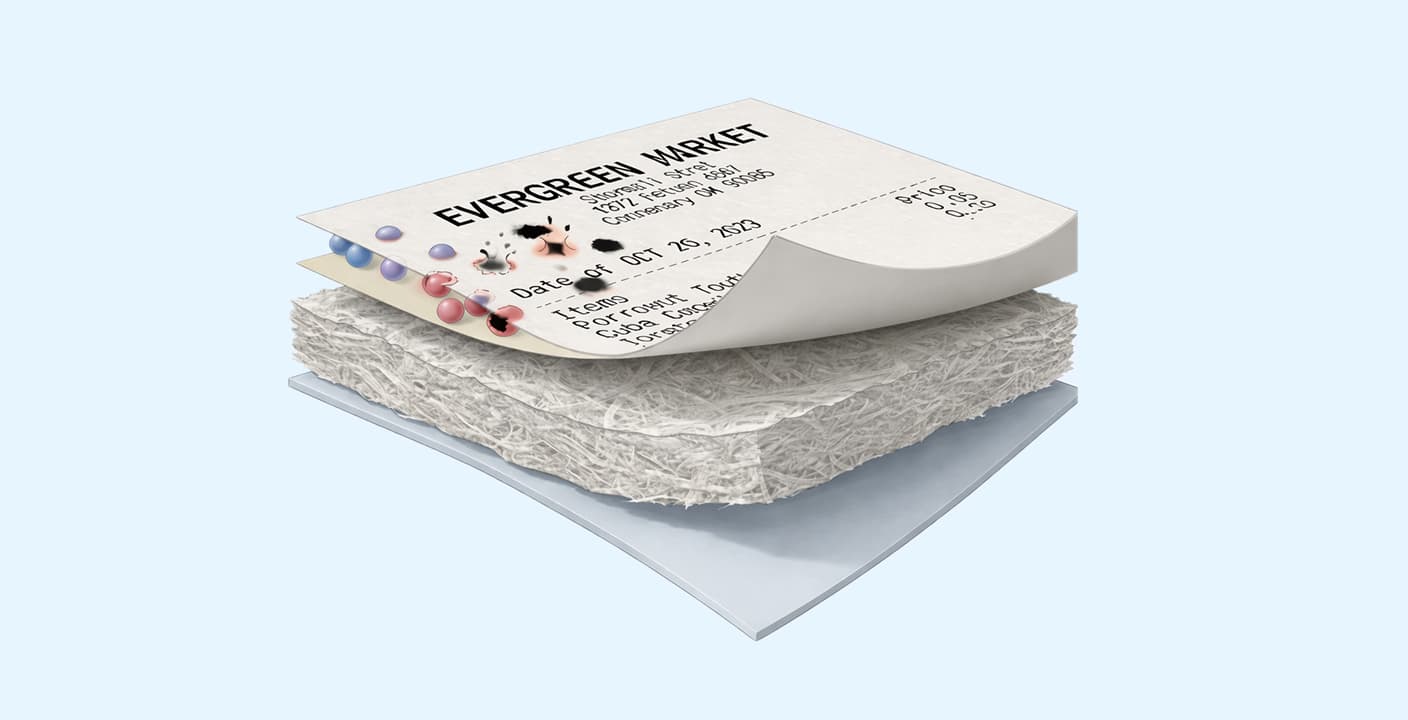
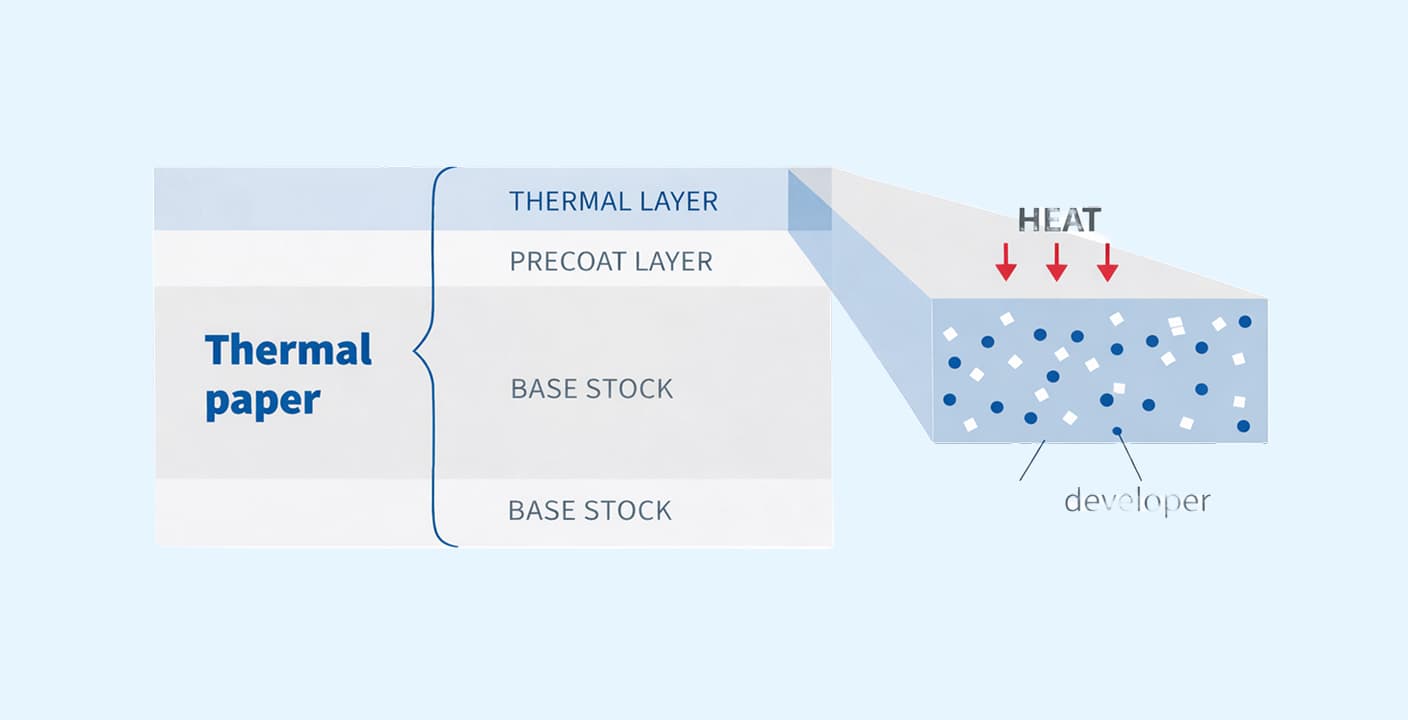
Thermal paper isn't just one sheet of wood pulp. It is a multi-layer sandwich designed to handle heat efficiently.
If you look at the cross-section of a high-quality receipt, you generally find four distinct layers.
| Layer | Function |
|---|---|
| Base Paper (Substrate) | Wood-pulp foundation providing thickness and tensile strength so the receipt doesn't tear |
| Pre-Coat (Undercoating) | Smooths the surface and insulates, keeping print-head heat focused on the active layer |
| Thermal Layer (Active Coat) | Holds the leuco dye and acid developer that react under heat to turn black |
| Top Coat (Protective Layer) | Optional layer protecting the image from water, oil, and plasticizers |
1. Base Paper (Substrate) This is the foundation. It is standard paper made from wood pulp. It provides the thickness and tensile strength so the receipt doesn't tear immediately when dispensed.
2. Pre-Coat (Undercoating) This layer sits between the base paper and the thermal layer. It serves two main purposes. First, it creates a smooth surface for printing. Second, and most importantly, it acts as an insulator. It prevents the heat from the print head from escaping into the base paper. This ensures all the heat stays focused on the active layer to create a sharp, dark image.
3. Thermal Layer (Active Coat) This is where the magic happens. This layer contains the chemistry: a dye (usually a leuco dye) and a developer (an acid). At room temperature, these two chemicals sit next to each other in solid form and do nothing. They are colorless.
When the print head applies heat (usually around 180°C or 355°F), the chemicals melt. They mix together, the acid reacts with the dye, and the mixture turns black (or blue, depending on the paper).
4. Top Coat (Protective Layer) Not all receipts have this, but premium ones do. This layer protects the thermal image from water, oil, and plasticizers (like the ones found in plastic wallets) that can cause the image to fade prematurely.
Why Do Receipts Fade?
We have all been there. You need to return an item you bought six months ago, you dig out the receipt, and it is completely blank.
Receipts fade because the chemical reaction in thermal paper is reversible. The "image" is essentially just a metastable mixture of dye and acid.
Several factors can reverse this reaction or trigger it uniformly, ruining the receipt:
- UV Light: Sunlight breaks down the chemical bonds, causing the text to lighten.
- Heat: Leaving a receipt on a car dashboard will turn the entire paper black because the ambient heat triggers the remaining unreacted chemicals.
- Friction: Rubbing the paper generates heat, creating unwanted streaks.
- Chemicals: Oils from your hands, lotions, or the plastic in a wallet can react with the coating and wash away the text.
This fragility is why knowing how to organize receipts for business is so important. You cannot rely on physical copies for long-term storage. The IRS accepts digital copies, so the best workflow is to scan or photograph thermal receipts immediately before they have a chance to fade.
Health Concerns: BPA and Testosterone
You may have heard rumors that receipts are toxic. Unfortunately, there is truth to this.
The "developer" chemical used in the thermal layer is often Bisphenol A (BPA) or its substitute, Bisphenol S (BPS). These are endocrine disruptors. They mimic estrogen in the body and can interfere with hormone levels.
Does Receipt Paper Affect Testosterone?
Studies have shown that handling thermal paper allows BPA to absorb through the skin. This is especially true if your hands are wet, greasy, or if you have just used hand sanitizer. Hand sanitizer breaks down the skin's barrier and acts as a solvent for the BPA, increasing absorption by up to 100 times.
While the amount absorbed from a single receipt is small, cumulative exposure is the concern. Cashiers who handle hundreds of receipts a day have significantly higher levels of BPA/BPS in their urine than the average person.
High levels of BPA are linked to lower testosterone levels and reproductive issues in men. Because of this, many regions (like the EU) have banned BPA in thermal paper, leading to the rise of "Phenol-Free" paper.
Here is a great breakdown of the chemistry and safety concerns:
Frequently Asked Questions
Here are the answers to the most common questions about thermal paper.
Do receipt printers run out of ink?
No. Receipt printers do not use ink or toner cartridges. The "ink" is effectively embedded in the paper itself in the form of colorless chemicals. The only consumable you need to replace is the roll of paper. If a receipt printer is printing faint text, it usually means the heat setting is too low or the paper roll is old, not that it is out of ink.
How long does receipt paper last?
It depends on the quality of the paper and how it is stored.
- Economy paper: 2 to 5 years under ideal conditions.
- Premium paper (top-coated): 10 to 25 years.
- Reality: If stored in a hot car or a wallet, it might only last a few weeks.
Does receipt paper dissolve in water?
No, it does not dissolve like toilet paper. However, water can ruin the image. If the thermal layer gets wet, the protective coating may break down, or the paper may pulp, making the text unreadable. It won't disappear into a liquid, but the receipt will be destroyed.
How does receipt paper print?
It prints using a thermal print head. The head heats up specific tiny dots on the paper as it passes through. This heat melts a chemical coating on the paper, causing a reaction that turns those specific spots black.